Meta rolled out a new feature on July 24, 2026, called Facebook Verified. It’s a free badge that confirms a real person sits behind a profile, and it shows up across Marketplace, Dating, Groups, and your profile page. Here’s what it actually does, how to get it, and what it means for anyone buying, dating, or joining groups on Facebook.
What Facebook Verified Actually Is
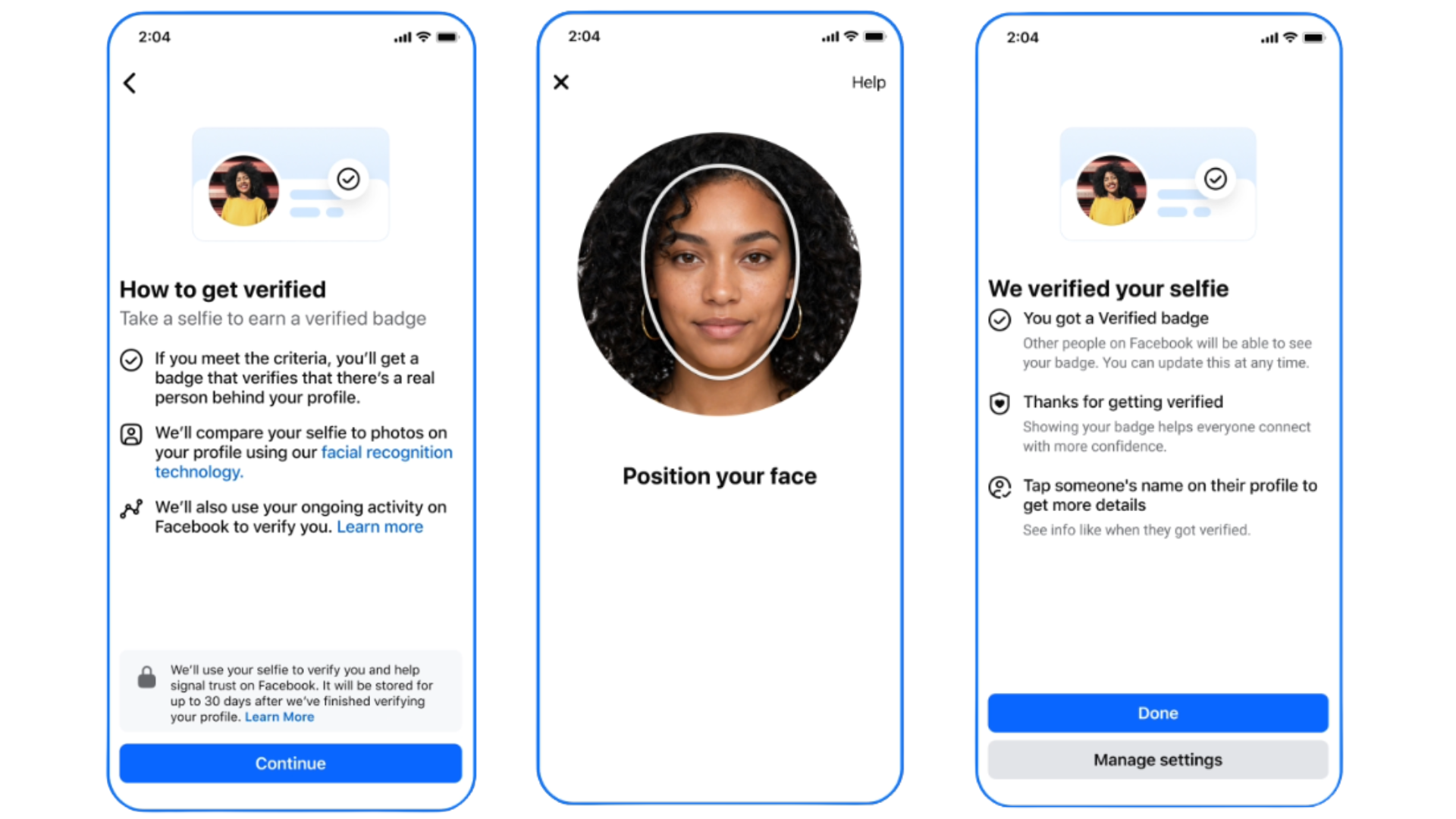
Facebook Verified is a free badge earned by recording a short video selfie. Meta checks that selfie against your existing profile photos, and if they match and your account is in good standing, you get a checkmark that follows you across the platform. The badge is a white checkmark inside a white circle, which is a deliberate visual break from the blue checkmark tied to Meta’s paid subscription tier.
That distinction matters, because it’s easy to confuse the two. Meta Verified is a paid subscription that gives creators and businesses a blue badge along with extra features and support. Facebook Verified is free, requires no subscription, and exists purely to confirm you’re a real human rather than a bot, a scam account, or an AI-generated persona. Don’t assume the two badges mean the same thing when you see them on someone’s profile.
It’s also different from the older business Page verification process, which required documents like a government-issued ID or proof of a registered company. Facebook Verified is built for everyday personal profiles, not brand pages. Pages and Professional Mode accounts aren’t eligible for it at all.
How the Selfie Check Actually Works
The process is short by design. You record a guided video selfie, often moving your head at different angles when prompted, and Meta’s facial recognition system compares the footage against photos already on your profile. If the system finds a match and your account clears Meta’s trust and safety checks, the badge is added automatically, usually within a few minutes.
According to Meta, the video selfie and the facial data generated from it are deleted within 30 days of verification. The badge itself stays on your account even after that data is removed. You only need to go through the process once to keep the badge, rather than reverifying on a recurring basis.
Where You’ll Actually See the Badge
The badge is rolling out first across four places: your profile, Marketplace listings, Dating profiles, and Groups. Meta has said Feed posts will get the badge in a later phase, so a verified checkmark next to a shared post isn’t part of the current rollout.
On Marketplace, the badge gives buyers a quick signal before they message a seller about a listing. On Dating, it offers some reassurance before you agree to meet someone you’ve only spoken to online. In Groups, it helps you gauge whether the person replying to your post is an actual member of the community rather than an account built to run a scam or spread spam.
Who’s Eligible Right Now
Eligibility is narrower than it might first appear. According to Meta, you need to be:
- At least 18 years old
- Using a personal Facebook profile, not a Page
- In good standing under Facebook’s Community Standards
- Free of a recent history of fraud, scams, or inauthentic behavior
- Not operating in Professional Mode
The rollout itself is happening in phases, market by market, so not everyone will see the prompt at the same time even if they meet every requirement above.
How to Get Verified
If your account is eligible, the process usually starts with an in-app prompt rather than a form you have to hunt down. Here’s the general flow reported so far:
- Open the Facebook app and check your profile, Marketplace, Dating, or Groups for a Facebook Verified prompt.
- Tap to start the process if you see it.
- Record a short video selfie, following the on-screen guidance for head movement.
- Wait a few minutes while Meta compares the selfie to your existing profile photos.
- If approved, the badge appears automatically on your profile and across Marketplace, Dating, and Groups.
If you don’t see a prompt yet, that likely means the feature hasn’t reached your account or market. Since the rollout is staged, checking your account settings periodically is currently the only real option beyond waiting.
What the Badge Does Not Mean
Meta has been explicit that the badge is not an endorsement. A checkmark confirms that a real, live person completed the selfie process and currently meets Facebook’s trust and safety standards. It does not confirm that the listing they’re selling is legitimate, that the person they say they are on a date is honest about their intentions, or that anything they post in a group is accurate.
Verified accounts are still bound by Facebook’s Community Standards and Commerce Policies, and Meta can still take action against a verified account that violates them. Treat the badge as one input alongside your own judgment, not a replacement for it.
The Privacy Context Worth Knowing
Meta’s relationship with facial recognition has been rocky. The company paid more than $7 billion in privacy settlements tied to earlier facial recognition practices and deleted roughly a billion face templates back in 2021 after backing away from the technology. Facebook Verified marks a return to that territory, though the company frames it differently this time: the badge is opt-in, and users knowingly submit a selfie for a specific stated purpose instead of having their face analyzed from photos without their knowledge.
Some researchers remain cautious. In June 2026, before Facebook Verified launched, EFF senior technologist Cooper Quintin reviewed dormant facial recognition code found distributed through Meta’s AI companion app and warned that the company had built the groundwork for turning its own users into a surveillance network. That review focused on a separate piece of code, not Facebook Verified itself, but it’s part of the wider backdrop against which Meta reintroduced facial recognition to its main app just weeks later.
The Bottom Line
Facebook Verified is a free, opt-in badge that confirms a real person is behind a profile on Marketplace, Dating, and Groups, based on a short selfie video checked against your existing photos. It’s not the same as the paid blue Meta Verified badge, and it’s not a guarantee that a verified person is trustworthy or telling the truth. Use it as one more data point before you respond to a listing, meet a match, or trust a stranger in a group, and keep your usual caution intact for everything else.